Self-hosted AI knowledge base · version 1.0
An AI assistant for your company documents that never leaves your server.
Employees ask in plain language and get answers from your own documents, with the sources shown. The model runs on your hardware: no AI vendor sees the questions, and no bill grows with them.
One license per company · $1,500 for the first 5 customers, then $2,500 · unlimited users
0
calls to cloud AI services
$0
per token, per seat, per question
AES-256
encryption for documents and chats
4
access levels, enforced in every answer
01Why local
Cloud AI sees everything your company asks it.
A cloud assistant works by sending your questions, and the documents behind them, to someone else's servers. Corpus keeps both on yours.
02The tour
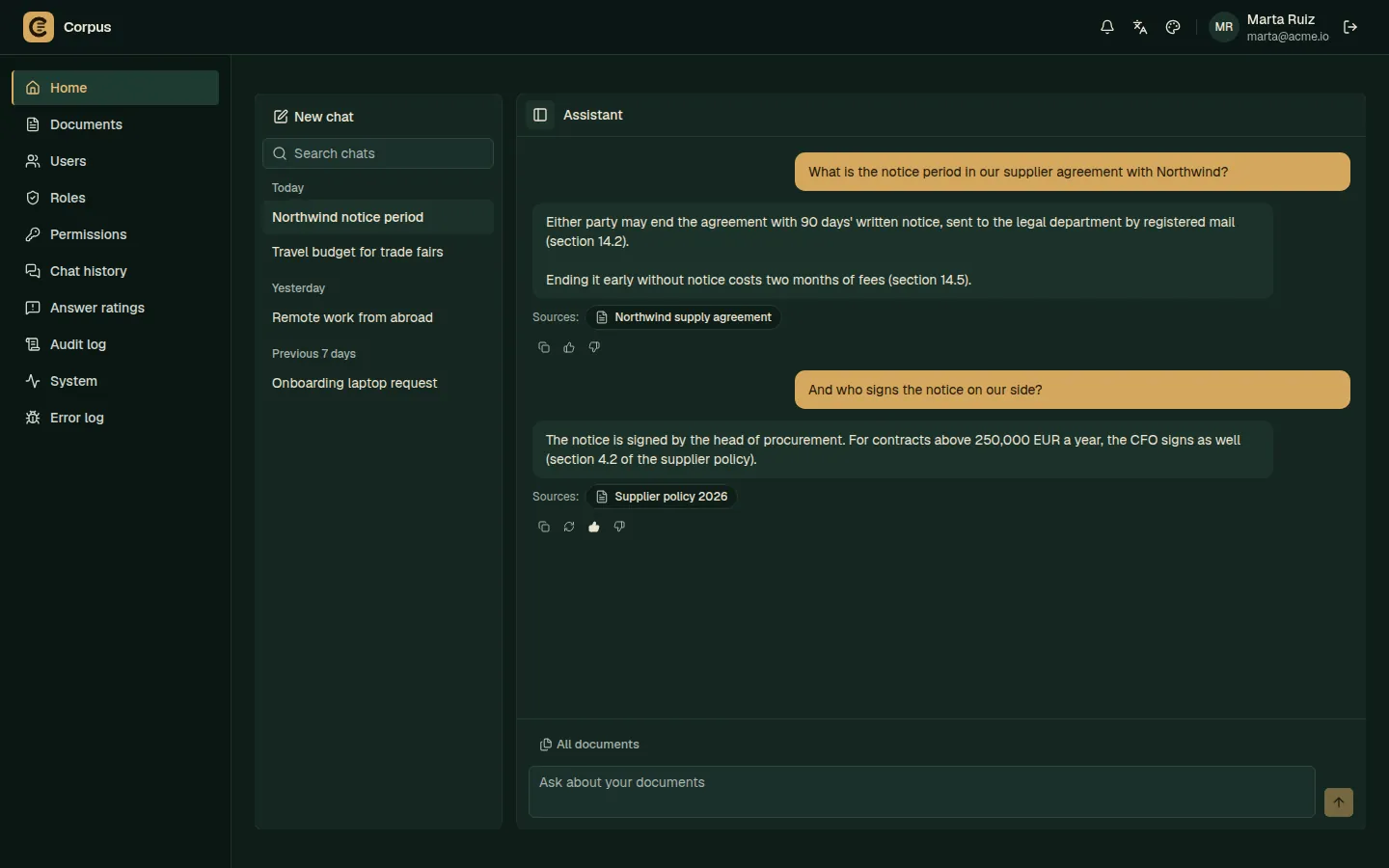
See a question answered from start to finish.
Upload, ask, read the answer, open the exact passage it came from.
Prefer to see it live? Book a free 30-minute call with the author.
03Themes
The same app, in your colors.
The tour shows the Neutral theme. Corpus comes with two light and three dark themes, everyone picks theirs in the header, and your team can add one in your company colors.
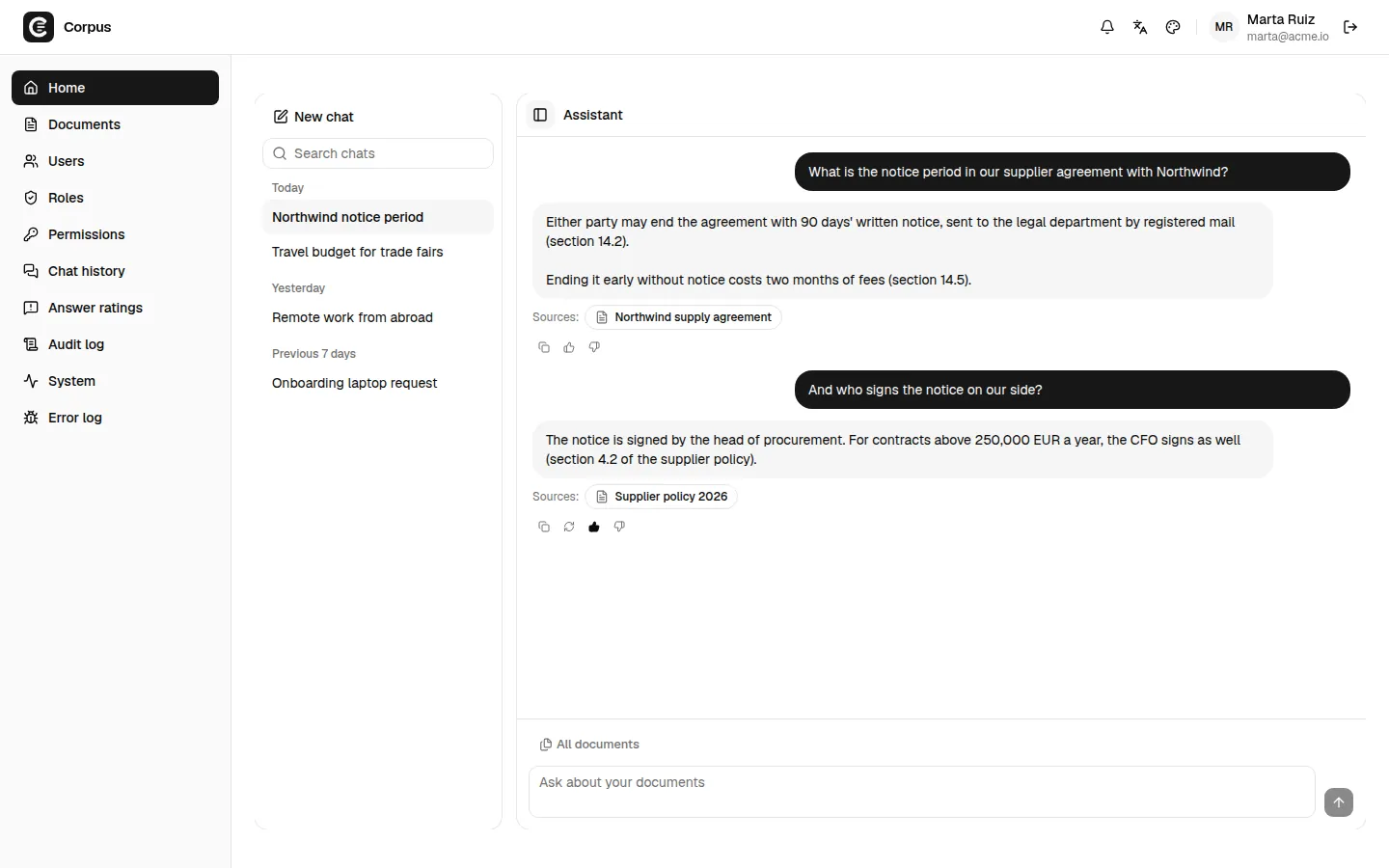
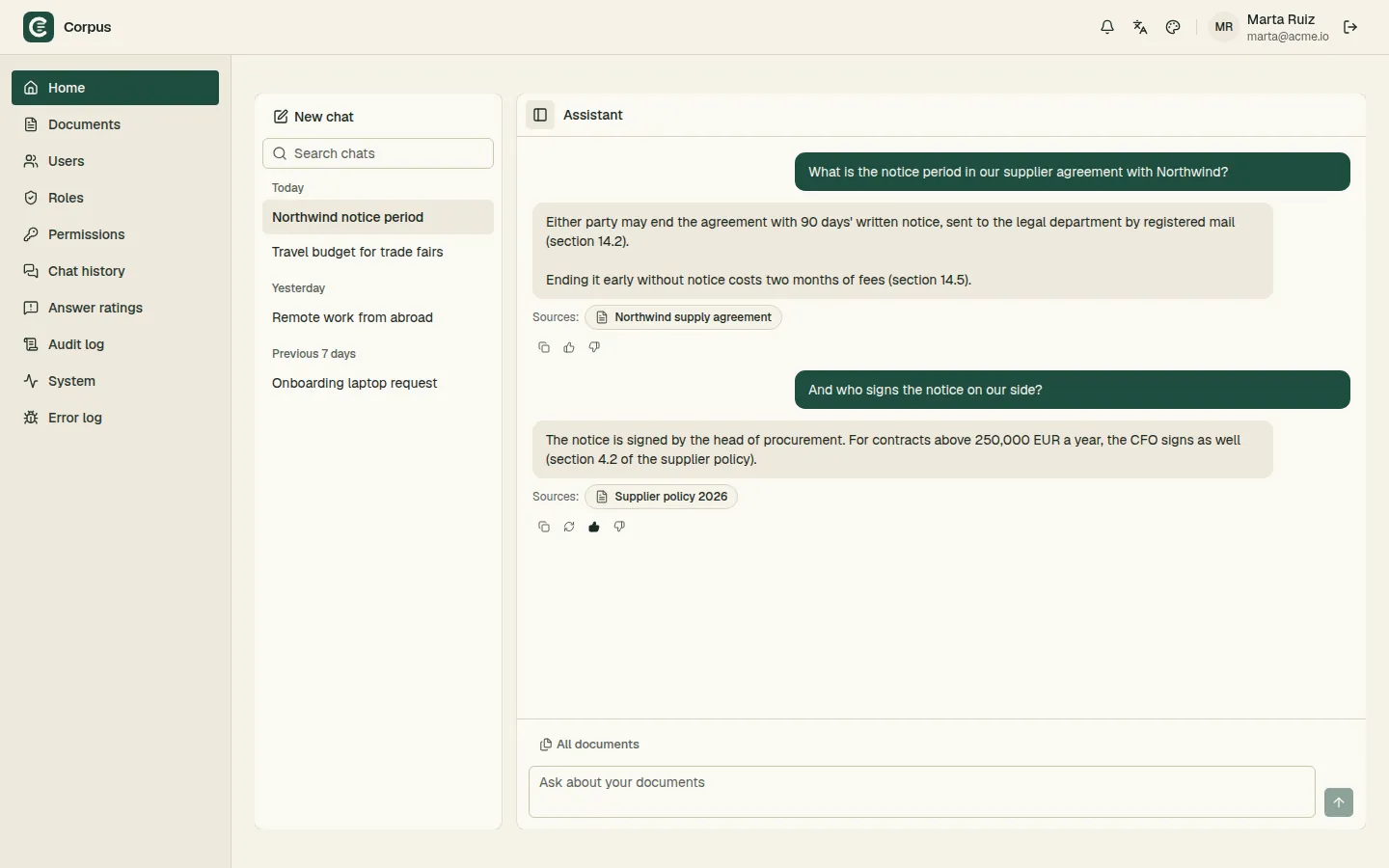
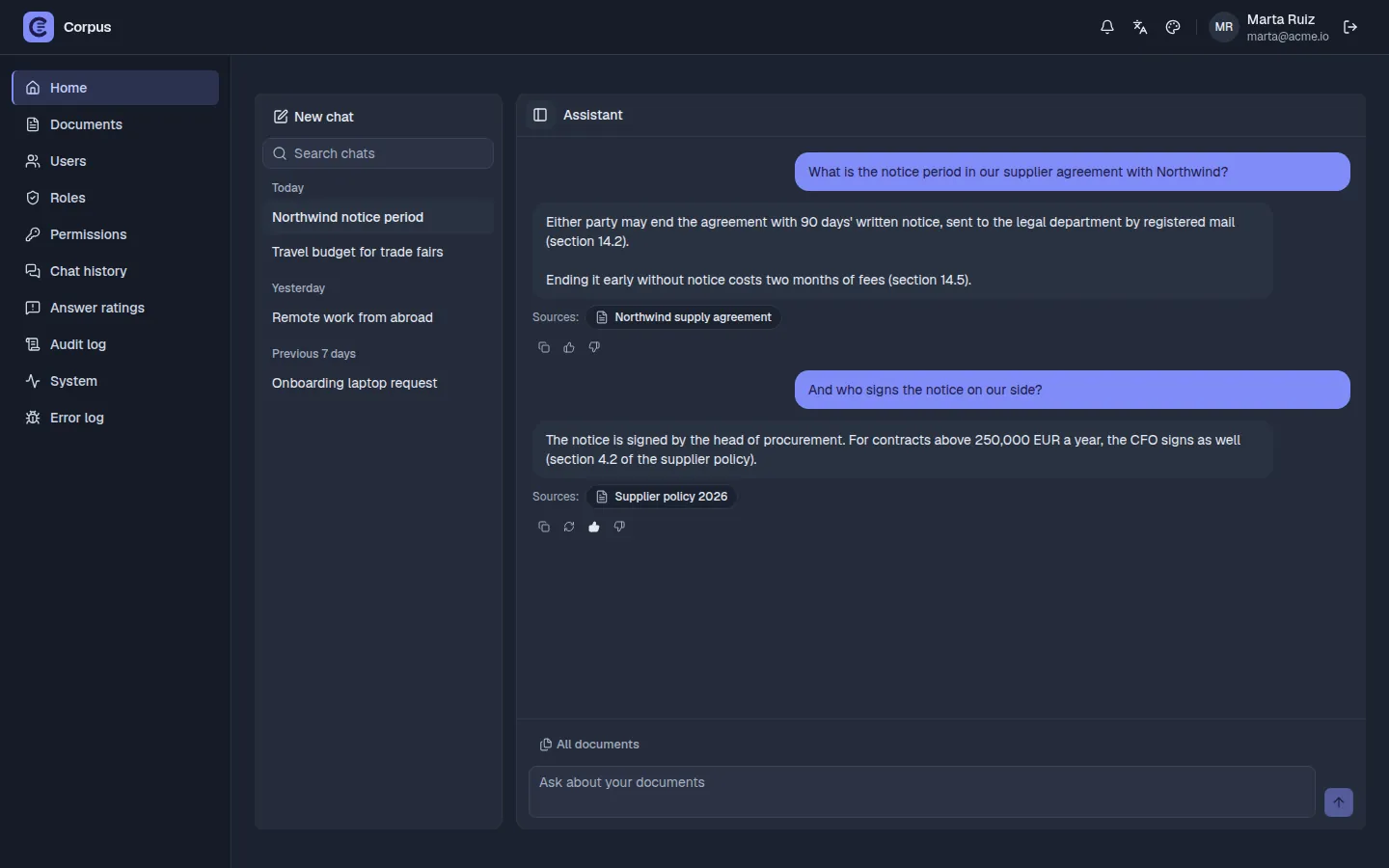
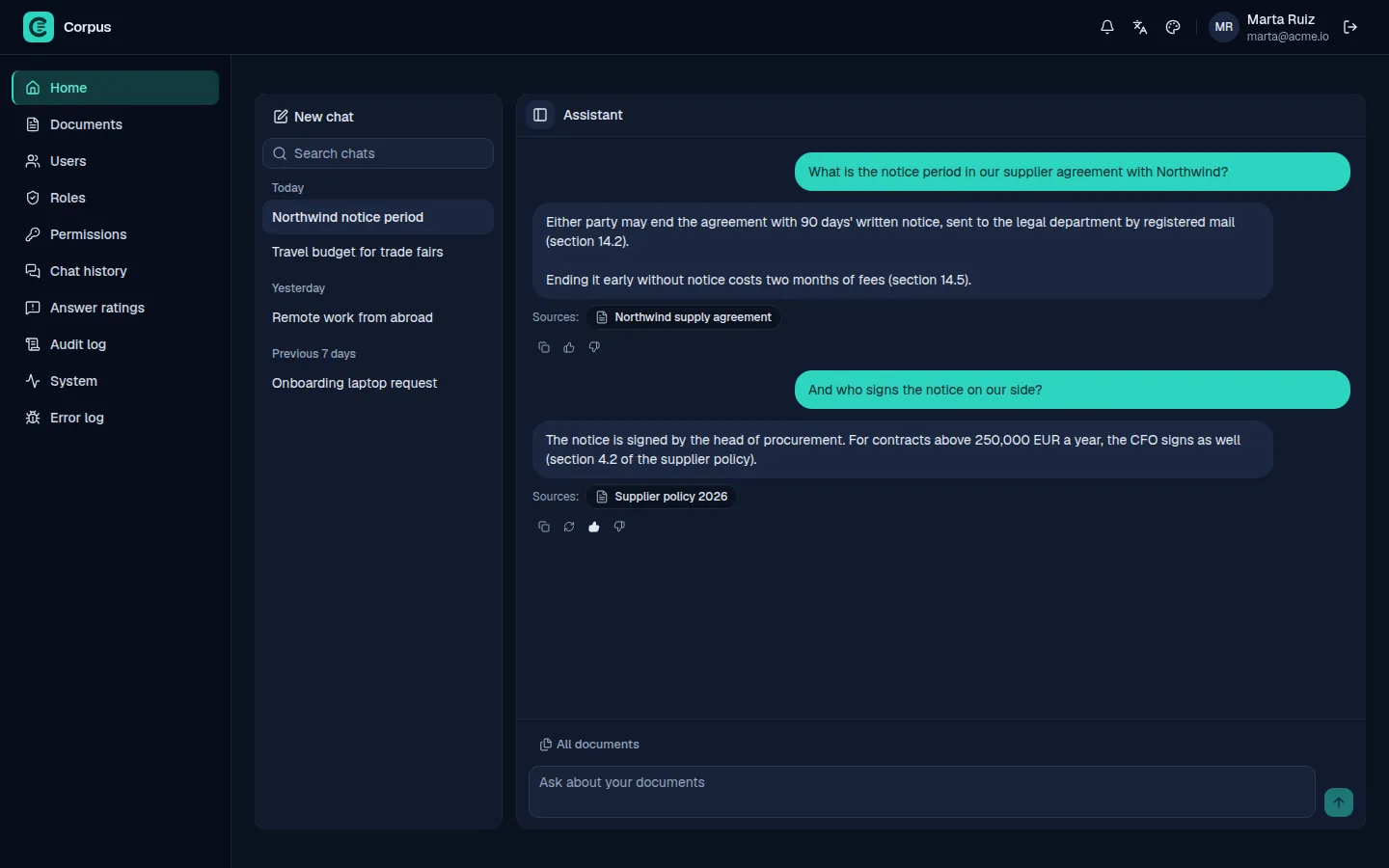
Your own theme is a small CSS file with your colors, kept in the custom/ folder: it survives every update, and you can make it the default for everyone.
04What it does
Answers your people can check, from documents only they may read.
- Answers with their sources
- Each answer lists the documents it used. Open a source to see the exact passage. When no document answers, Corpus says so instead of making something up.
- Four access levels
- Standard, restricted, confidential, secret. The assistant answers only from documents the person asking is allowed to read.
- An audit log for every read
- Sign-ins, changes, document reads, including the documents the assistant read to write an answer.
- Single sign-on
- OpenID Connect with Microsoft Entra ID, ADFS, Keycloak, Okta and others. Roles follow your directory groups.
- Finds names and numbers exactly
- Meaning-based search plus exact keyword matching, so contract numbers, product codes and names are found word for word.
- The files you already have
- PDF, Word, OpenDocument, Excel, CSV, JSON, XML, Markdown and text. Tables and headings keep their structure.
- English, Spanish, French
- The interface and the assistant work in all three. Use one, or let each person pick theirs.
- Safe defaults
- HTTPS, encryption, retention periods and sign-in limits are on from the first start. Backups are encrypted too.
05Use cases
One assistant for every team that works from documents.
Examples of what people ask. Corpus answers from the documents you upload, and only from those the person asking may read.
- LegalWhat is the notice period in our supplier agreement with Northwind? Contracts and agreements
- HRHow many vacation days does a new employee get? HR policies and the employee handbook
- SupportWhat are the steps to replace a damaged delivery? Procedures and product manuals
- FinanceWho has to approve a contract above 250,000 EUR a year? Approval policies and price lists
06Installation
Installs on one Linux server, with one script.
Corpus runs as a Docker Compose stack on a single Linux server. A guided setup asks a few questions, picks the models and generates every password and key.
Run the guided setup
It asks for the languages, the AI model and the chat limits, and shows how much memory each choice needs.
Build and start
The first start downloads the AI models. Later starts need no internet.
Create the administrator
Sign in, add roles and users, upload documents. Updates, backups and restores use the same script.
No Kubernetes. Day-to-day changes go through one more command: configure.
# 1. guided setup
$ cd backend && uv run setup
? Languages       en, es, fr
? AI model        llama3.1:8b
? Single sign-on  Microsoft Entra ID
✓ secrets and encryption key generated

# 2. build and start
$ deploy/deploy.sh build
$ deploy/deploy.sh up

# 3. first administrator
$ deploy/deploy.sh admin it@company.com
✓ open https://corpus.company.local
$
07Hardware
Starts on a 16 GB server with no GPU.
An 8B model answers on an ordinary server. Add a GPU later for faster answers, or a bigger one for a bigger company. Corpus scales up: one stronger server serves more people.
| Size | Small | Medium | Large |
|---|---|---|---|
| Typical company | Up to 50 users | 50 to 500 users | 500 users and more |
| AI model | llama3.1:8b or qwen3:8b | gemma3:12b | gemma3:27b, qwen3:32b or llama3.3:70b |
| Minimum | 4 cores · 16 GB RAM · 80 GB SSD · no GPU | 8 cores · 32 GB RAM · 150 GB SSD · 16 GB VRAM | 16 cores · 64 GB RAM · 500 GB NVMe · 48 GB VRAM |
| Recommended | 8 cores · 32 GB RAM · 200 GB SSD · 12 GB VRAM | 16 cores · 64 GB RAM · 500 GB NVMe · 24 GB VRAM | 32 cores · 128 GB RAM · 1 TB NVMe · 80 GB+ VRAM |
All tiers: 64-bit Linux, Docker Compose v2, an x86-64 CPU with AVX2, an SSD. Without a GPU an answer takes tens of seconds.
08Independence
Your installation does not depend on us.
Corpus is made by an independent developer, and it is built so that your company never needs its author to keep it running.
- You get the source code
- The whole application, not a black box. Your team can read it, audit it and adapt it for your internal use.
- A perpetual license
- When the 12 months of updates end, Corpus keeps working. You keep the last version you received, for good.
- Nothing to phone home to
- No license server and no activation call. Corpus runs on your network whether or not we are online.
- Change it without forking
- Add API endpoints, pages, permissions, themes and translations in custom/, and keep receiving updates.
09Pricing
One price for the whole company.
One license for the company, with no per-user fees: hire more people without paying more. Updates after the first year are optional.
Corpus licenseFounding customer price
$1,500Regular price $2,500
one-time, per company
- One production installation, plus test, staging and backup copies
- Unlimited users and questions
- Full source code
- 12 months of updates: new features, bug fixes and security fixes
- Perpetual use of every version received
- Email support while updates are active, with a reply within 3 business days
- A full refund within 14 days if Corpus does not suit you
Later, only if you want them
- Updates after the first year: $450 a year
- Priority support: $500 a year
- Priority support free for 3 months
- A direct line to the author and help with installation
- Bugs you report are fixed first
In return, we ask for your feedback on how Corpus works for you.
Need a formal quote for your procurement team first? Ask for a quote.
Want to see it first? Book a free 30-minute call: the author shows Corpus and answers your questions. Book a call.
Your security team will want the details: read the security overview.
10Questions
Before you buy
Does anything leave our network?
No question or answer does. Corpus calls no cloud AI service, and after installation its containers have no route to the internet. They only have narrow paths to the services you connect yourself: HashiCorp Vault, your SSO provider, your S3 storage. Document files leave the server only if you choose to keep them in your S3 storage, and then they arrive there encrypted.
Where can our security team read the details?
The security overview covers the network, encryption, keys, access control, sign-in, the audit log and what Corpus does not encrypt. It prints to PDF from the browser. Open the security overview.
Do we need a GPU?
No. The default 8B model runs on 4 cores and 16 GB of RAM. A GPU makes answers several times faster, and larger models need one.
What do updates include?
Every new version: new features, bug fixes and security fixes. The first 12 months of updates come with the license.
What happens after the 12 months of updates?
Corpus keeps working. You keep using the last version you received, with no time limit. To keep receiving updates, renew for $450 a year; each renewal adds 12 months from the day the previous period ended. If you let updates lapse and want them back later, reinstating them costs $750.
What is the founding customer offer?
The first 5 companies pay $1,500 instead of $2,500 and get priority support free for 3 months: a direct line to the author, help with installation, and the bugs they report fixed first. Updates and renewals work as for everyone else. In return, we ask for feedback.
Can we get a refund?
Yes, a full refund within 14 days of the purchase, for any reason. A refund ends the license: your company stops using Corpus and deletes every copy, including the source code. Read the refund policy.
Can we modify Corpus?
Yes, for your own internal use. Most changes belong in the custom/ folders, so updates still apply cleanly.
We are an IT integrator. Can we install it for our clients?
Not with one license. Each company that uses Corpus needs its own license, and the license does not allow installing it for others or offering it as a hosted service. Write to us about working together.
Is support included?
Yes, by email, while your updates are active: tickets are answered in order, within 3 business days. Priority support costs $500 a year: a direct line to the author, a reply within 1 business day, help with installation, and your bugs fixed first. Bug reports are welcome from every customer.
Can we see Corpus before we buy?
Yes. Book a free 30-minute call: the author shows Corpus on a live installation, and you ask whatever you need, from security to hardware.
Which AI models does it use?
Open models run by Ollama: llama3.1:8b by default, and qwen3, gemma3 or llama3.3 for larger installations. You download them during setup, under their own licenses.